Skip to content
  • Categories
  • Recent
  • Tags
  • Popular
Skins
  • Light
  • Brite
  • Cerulean
  • Cosmo
  • Flatly
  • Journal
  • Litera
  • Lumen
  • Lux
  • Materia
  • Minty
  • Morph
  • Pulse
  • Sandstone
  • Simplex
  • Sketchy
  • Spacelab
  • United
  • Yeti
  • Zephyr
  • Dark
  • Cyborg
  • Darkly
  • Quartz
  • Slate
  • Solar
  • Superhero
  • Vapor

  • Default (Cosmo)
  • No Skin
Collapse
Brand Logo
  1. Home
  2. Support
  3. Game bug !!!

Game bug !!!

Scheduled Pinned Locked Moved Support
11 Posts 4 Posters 348 Views 3 Watching
  • Oldest to Newest
  • Newest to Oldest
  • Most Votes
Reply
  • Reply as topic
Log in to reply
This topic has been deleted. Only users with topic management privileges can see it.
  • B Baraa711

    I need help !
    the game suddenly did this I can't see my slots and profile I tried all the ways to solve it I couldn't find any solution from my side I tried to update and uninstall and installed it again and changed the server from the setting and nothing happened my account still available I'm playing the game on the browser but it's too slow and I can't control well from the browser
    Is there any help
    here is a picture of the problem bc093453-5af2-4bbc-a820-be0af7df8e2e.jpg
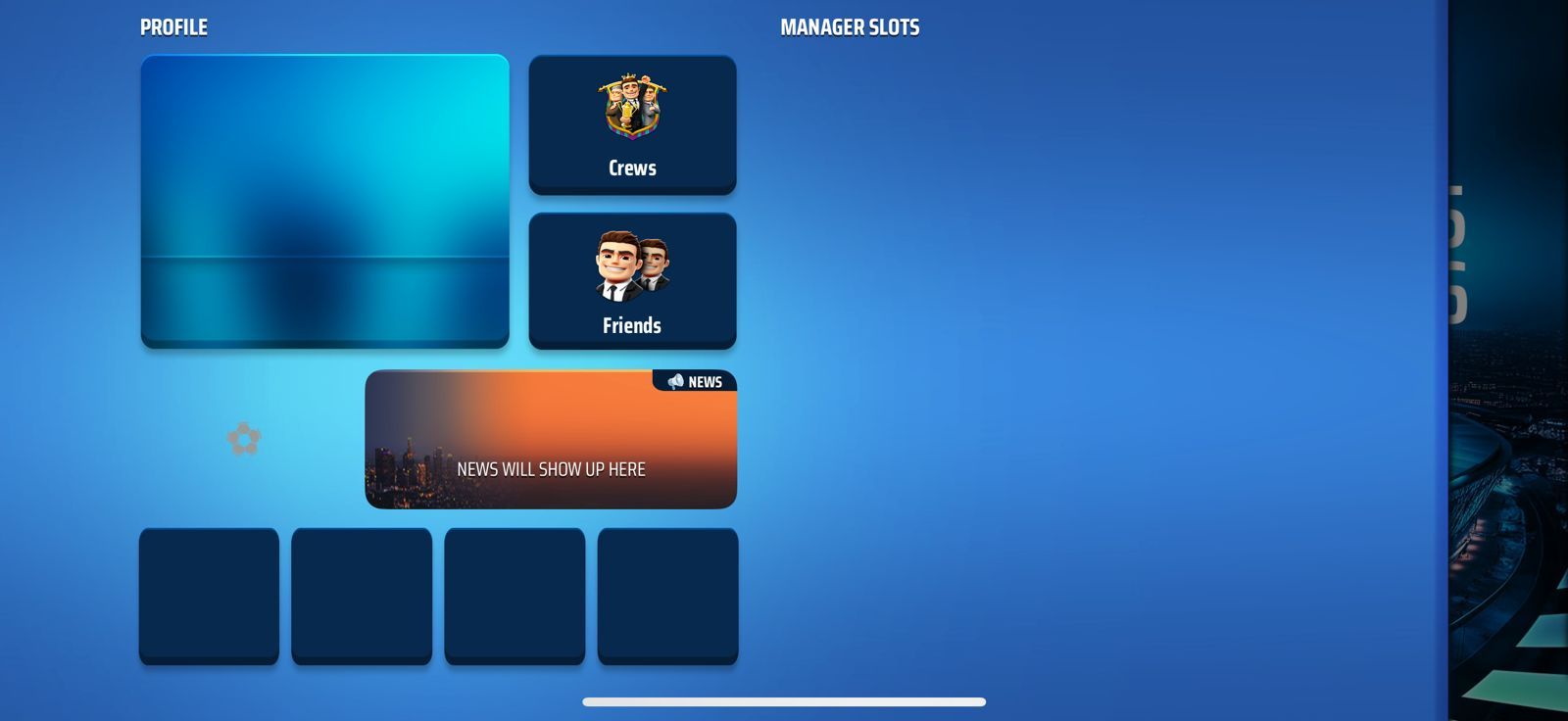
    I tried all solutions people says to resolve and couldn't find a way to resolve this
    Thanks .

    FC Eddie_NLF Offline
    FC Eddie_NLF Offline
    FC Eddie_NL
    Moderator NL
    wrote on last edited by
    #2

    @Baraa711

    Hi there,

    You could try the following steps:

    1. Remove all app data
    2. Remove the OSM app from your phone
    3. Turn off your phone completely and power it back on
    4. Install the OSM app again.

    Hopefully this will solve it.

    B 1 Reply Last reply
    0
    • FC Eddie_NLF FC Eddie_NL

      @Baraa711

      Hi there,

      You could try the following steps:

      1. Remove all app data
      2. Remove the OSM app from your phone
      3. Turn off your phone completely and power it back on
      4. Install the OSM app again.

      Hopefully this will solve it.

      B Offline
      B Offline
      Baraa711
      wrote on last edited by
      #3

      @FC-Eddie_NL
      @FC-Eddie_NL
      It doesn’t help I tried now
      Then i said i tried to remove it and uninstall it several times and did all solutions you said
      What can i do ?!
      Is there any possible solution can resolve the problem from your side ?
      Thanks

      FC Eddie_NLF 1 Reply Last reply
      0
      • B Baraa711

        @FC-Eddie_NL
        @FC-Eddie_NL
        It doesn’t help I tried now
        Then i said i tried to remove it and uninstall it several times and did all solutions you said
        What can i do ?!
        Is there any possible solution can resolve the problem from your side ?
        Thanks

        FC Eddie_NLF Offline
        FC Eddie_NLF Offline
        FC Eddie_NL
        Moderator NL
        wrote on last edited by FC Eddie_NL
        #4

        @Baraa711

        Is this on the iOS app or the Android app? And what version of the OSM app do you have?

        B 2 Replies Last reply
        0
        • FC Eddie_NLF FC Eddie_NL

          @Baraa711

          Is this on the iOS app or the Android app? And what version of the OSM app do you have?

          B Offline
          B Offline
          Baraa711
          wrote on last edited by
          #5

          @FC-Eddie_NL
          iOS app with the latest updated version
          Version 4.14.14

          1 Reply Last reply
          0
          • FC Eddie_NLF FC Eddie_NL

            @Baraa711

            Is this on the iOS app or the Android app? And what version of the OSM app do you have?

            B Offline
            B Offline
            Baraa711
            wrote on last edited by
            #6

            @FC-Eddie_NL
            It’s ios app with the latest updated version
            4.14.14

            FC Eddie_NLF 1 Reply Last reply
            0
            • B Baraa711

              @FC-Eddie_NL
              It’s ios app with the latest updated version
              4.14.14

              FC Eddie_NLF Offline
              FC Eddie_NLF Offline
              FC Eddie_NL
              Moderator NL
              wrote on last edited by
              #7

              @Baraa711

              Thanks. I have forwarded this issue to the admins.

              B 1 Reply Last reply
              0
              • FC Eddie_NLF FC Eddie_NL

                @Baraa711

                Thanks. I have forwarded this issue to the admins.

                B Offline
                B Offline
                Baraa711
                wrote on last edited by
                #8

                @FC-Eddie_NL
                Any updates ?

                FC Eddie_NLF 1 Reply Last reply
                0
                • B Baraa711

                  @FC-Eddie_NL
                  Any updates ?

                  FC Eddie_NLF Offline
                  FC Eddie_NLF Offline
                  FC Eddie_NL
                  Moderator NL
                  wrote on last edited by
                  #9

                  @Baraa711

                  No news about it.

                  7 1 Reply Last reply
                  0
                  • FC Eddie_NLF FC Eddie_NL

                    @Baraa711

                    No news about it.

                    7 Offline
                    7 Offline
                    7kom189
                    wrote last edited by
                    #10

                    @FC-Eddie_NL any update? I have the same issue ![alt text](![image url](![image url](image url)))

                    1 Reply Last reply
                    0
                    • K Offline
                      K Offline
                      Kartal_Kaan
                      wrote last edited by
                      #11

                      Possible fixes you can try:

                      • Clear the app cache (Android):
                        Go to Settings → Apps → Online Soccer Manager → Storage → Tap “Clear Cache”.

                      • Check for updates:
                        Make sure the game is updated to the latest version via the Google Play Store or App Store.

                      • Reinstall the game:
                        Delete and reinstall the game. (Your progress won’t be lost if your account is connected.)

                      • Restart your device:
                        Simple, but often effective.

                      • Try using a VPN:
                        Sometimes Online Soccer Manager servers may have regional issues.
                        Try connecting through a different country using a VPN.

                      • Check date and time settings:
                        Go to Settings → Date & Time → Enable “Automatic”.
                        Incorrect time settings can prevent connection to the servers.

                      1 Reply Last reply
                      0
                      Reply
                      • Reply as topic
                      Log in to reply
                      • Oldest to Newest
                      • Newest to Oldest
                      • Most Votes


                      • Login

                      • Login or register to search.
                      • First post
                        Last post
                      0
                      • Categories
                      • Recent
                      • Tags
                      • Popular